Note III · Feature
Maestro Cue: agents that pick up work on their own
Cue is the trigger engine in Maestro. You say what should happen and what sets it off, and your agents act on a schedule, on a file change, or on a pull request. You do not have to write the config: the agent in the app builds the pipeline for you.

Most people climb the same ladder with coding agents. First you chat with an agent. Then you hand it a whole task and let it run. Then you write the steps down once, as an Auto Run playbook, and the agent executes them on demand.
The next rung is harder: how does an agent pick up work when nobody tells it to?
Maestro Cue answers that question. Cue is a trigger-based pipeline engine (docs). You define what should happen and what sets it off. Then your agents act on their own.
What can set an agent off
A Cue subscription pairs one trigger with one action. The triggers cover most of the reasons you would otherwise start an agent by hand:
| Trigger | Fires when |
|---|---|
time.scheduled | the clock reaches a set time, on set days |
time.heartbeat | every N minutes |
time.once | once, at a set time |
file.changed | a file that matches a glob changes |
task.pending | a Markdown document has unchecked tasks |
github.pull_request, github.issue, github.label | something new appears in a repository |
agent.completed | another agent (or a shell command) finishes |
webhook.received | an HTTP request arrives |
cli.trigger | a script runs maestro-cli cue trigger <name> |
app.startup | Maestro starts |
Fig. 1 · What sets an agent off
Every trigger, two actions
flowchart TB
  subgraph EV["What sets it off"]
    direction LR
    T1["Schedule"] ~~~ T2["File change"] ~~~ T3["GitHub PR, issue, label"]
    T4["Agent completion"] ~~~ T5["Webhook or CLI"] ~~~ T6["App startup"]
  end
  EV --> CUE[".maestro/cue.yaml"]
  CUE -->|"prompt"| AG["An agent works"]
  CUE -->|"command"| SH["A script runs, no model"]
  class CUE step
The action is usually a prompt to an agent. It can also be a notification toast, or a plain shell command.
You can build a pipeline three ways, and all three edit the same .maestro/cue.yaml file:
- The Pipeline Editor. Drag triggers onto a canvas and connect them to agents.
- YAML. Edit the file directly if you prefer config.
- Chat. Tell an agent what you want and let it wire the pipeline.
Most of our pipelines start the third way.
The agent in the app knows the app
The agent inside Maestro can drive Maestro. It does this through maestro-cli, which reaches nearly every control in the app: Cue, Auto Run, agents, groups, settings, themes.
So when you describe an automation, the agent does not write config and hope. It runs the same operations you would have run by hand. A request like “every weekday at nine, draft my standup” becomes one command:
maestro-cli cue schedule --daily-at 09:00 --days mon,tue,wed,thu,fri \
  --agent <agent-id> --prompt "Draft the standup"
The agent then checks its own work:
maestro-cli cue schedule --list --kind daily
maestro-cli cue list
It does not get the schedule format wrong, because it does not type a schedule format. It calls the tool that owns it.
The marketing department nobody coded
The clearest way to show what this buys you is a pipeline that runs every day. The operation behind the @RunMaestroAI account on X runs on Cue.
It started as a conversation. The request was roughly this: every morning, find what people are talking about in our space. Have a few agents argue out the best angle. Draft posts in our voice and queue them to publish. Then measure what landed and keep a dashboard current.
Nobody opened the YAML. Nobody dragged a node. An agent picked the triggers, set the schedules, named the stages, connected them, and saved the pipeline. This is the result:
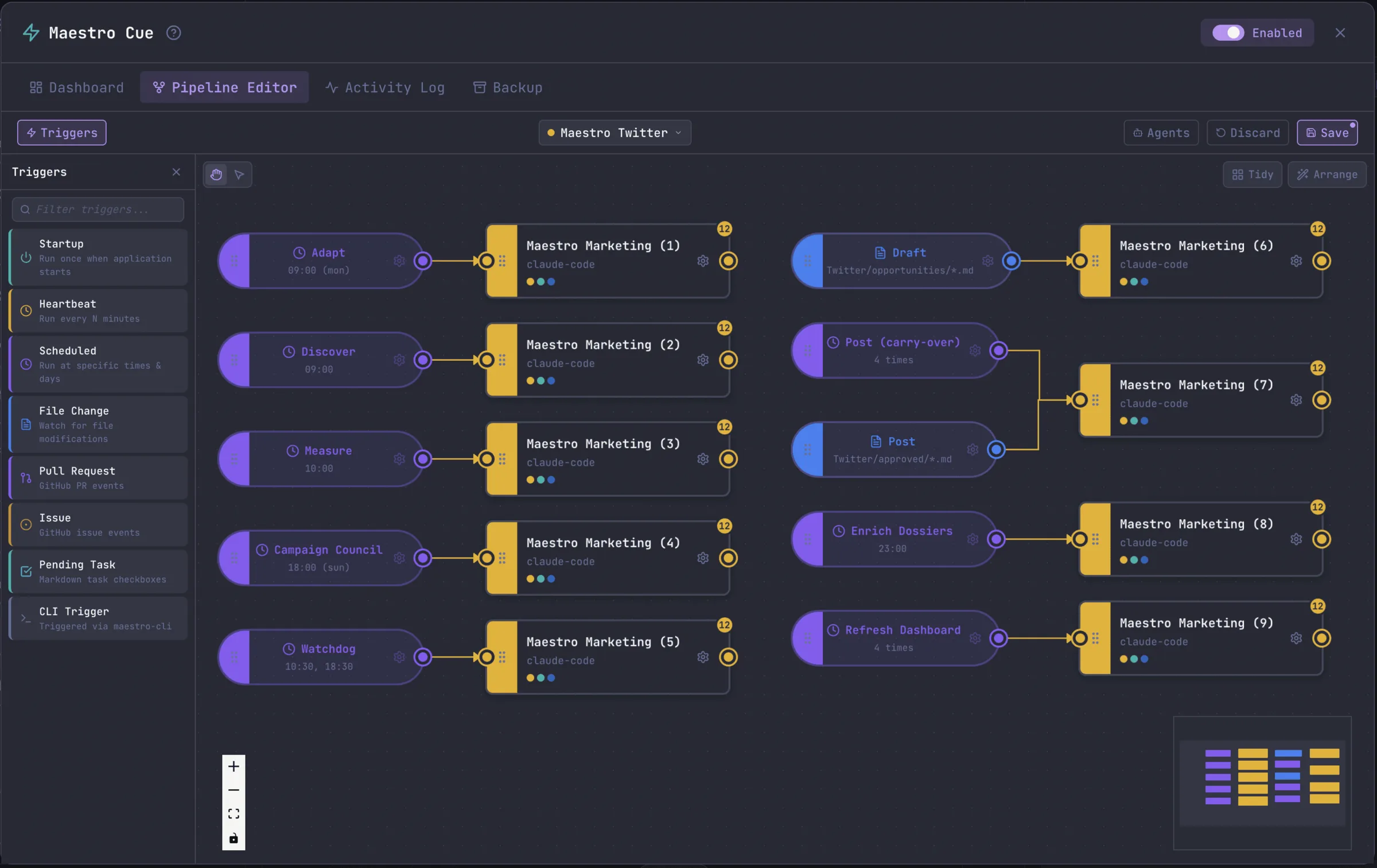
Every card is a job that fires on its own. Most run on the clock. Two watch folders for new files. Read it card by card and you can follow the whole operation without knowing anything about the file format:
- Discover runs at 09:00. It finds what is worth talking about: trends, conversations, threads that are heating up.
- Campaign Council runs Sunday at 18:00. Several perspectives argue out what the campaigns should be, instead of one agent guessing.
- Adapt runs Monday at 09:00. It folds the Council’s recommendations into the strategy the other jobs read.
- Draft fires when Discover writes a new file to
opportunities/. It turns candidates into posts, in voice, ready to ship. - Post fires when a draft lands in
approved/. A second trigger, Post (carry-over), runs four times a day. Both feed one publish step, so nothing in the queue gets dropped on a quiet day. - Measure runs at 10:00. It scores what went out and what landed.
- Enrich Dossiers runs at 23:00. It keeps the files on key people and accounts current, so the next campaign starts from context.
- Refresh Dashboard runs four times a day and regenerates the reporting.
- Watchdog runs at 10:30 and 18:30. It flags anything that stalled.
Discover, decide, draft, publish, measure, repeat. You look at the dashboard when you want to, not because the machine is waiting on you. The Cue docs walk through this pipeline chain by chain.
When you want to change it, you do not hunt for the right field. You tell the agent “add a step that replies to mentions,” and a new node appears on the canvas.
Anything you can click, an agent can do
Cue is one example. It is not the limit.
Anything you can do in Maestro by pointing and clicking, an agent can do when asked. A few of the commands it reaches for:
| You ask | The agent runs |
|---|---|
| ”Spin up an agent for this repo” | maestro-cli create-agent |
| ”Run these playbook documents” | maestro-cli auto-run |
| ”Switch to a dark theme” | maestro-cli set-theme |
| ”Show me the Cue activity” | maestro-cli cue activity or maestro-cli open cue --tab activity |
| ”Turn that job off for now” | maestro-cli cue disable "<name>" |
The agent is not bolted onto the side of the app. It lives inside the app and has the run of it. That is why the marketing pipeline needed no special integration, no plugin, and no glue code.
What you would build
Marketing is just the example that happens to be running. The same move works anywhere you would otherwise reach for a pile of scripts and cron jobs:
- A research desk that scans your sources every morning, has a council of agents decide what matters, and leaves you a briefing.
- A release pipeline where a new pull request triggers a review, a test pass, and a changelog draft.
- A personal CRM that notices who you have not talked to in too long and drafts the outreach.
- A content engine that turns one long piece into a week of posts, schedules them, and reports which ones worked.
- A watchdog that pings you only when something is actually wrong.
You do not start any of these by learning a configuration format. You start by describing what you want.
For a second worked example, the Maestro message bus is a Cue pipeline that puts an agent on the other end of an iMessage thread. When your pipeline grows past a handful of jobs and has to run unattended, Graph engineering when the graph never sleeps covers what breaks and how to catch it.
The old way to automate was to learn a tool, write the wiring yourself, and maintain a pile of half-broken scripts. With Cue, you describe the outcome and an agent that lives in the app assembles the machinery. The marketing department above began as a few sentences.